Entity Minds
An Entity Mind is a complete personality template for one NPC. Create them in the dashboard, use them in your game.
What’s an Entity Mind?
Think of it as a character sheet:
- Who the NPC is - Name, role, personality
- How they talk - Speaking style, tone
- What they know - Which lore they can reference
- Who they know - Relationships with other NPCs
Once created, select it from a dropdown in your game engine’s SDK - no code needed.
Creating an Entity Mind
- Go to Entity Minds in the dashboard
- Click Create Entity Mind
- Choose a creation method:
- Generate from Lore - AI creates personality based on your lore and a brief description
- Create Manually - Full control over every field
- Fill in the details and click Create Entity Mind
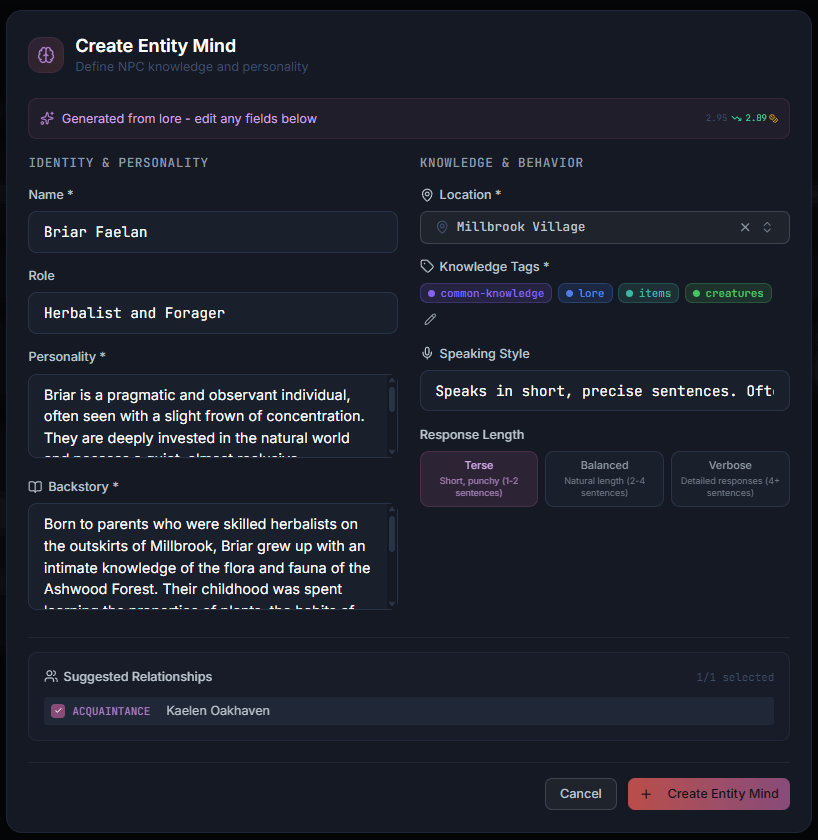
The screenshot shows an AI-generated NPC with personality, backstory, speaking style, and suggested relationships - all created from a location and brief description.
Writing Great NPC Personalities
The personality field is the most important part of an Entity Mind. Here’s how to write personalities that bring NPCs to life.
Be Specific, Not Vague
Vague (avoid):
Nice person who helps players.Specific (good):
Cheerful innkeeper who loves gossip. Always has a story to share and
treats regulars like family.
Why it matters: Vague descriptions produce generic responses. Specific traits give the AI clear direction.
Include Behavioral Patterns
Don’t just describe who they are - describe how they act:
Nervous wizard who speaks quickly and interrupts himself mid-sentence.
Gets distracted by magical theory and forgets what he was saying.
This gives the AI concrete behaviors to emulate.
Keep It Short
1-3 sentences is ideal. Long personalities dilute key traits.
Too long:
Garrick is a 45-year-old innkeeper who was born in Thornhaven but moved
to the capital 20 years ago after the dragon war destroyed his hometown.
He married his wife Sarah and they had three children. He enjoys fishing
on weekends and his favorite color is blue. He sometimes feels nostalgic
about his childhood home and wonders what his life would have been like
if he had stayed. He is friendly but can be short-tempered when drunk
customers cause problems. He loves his ale collection and knows every
brand. He considers himself a good judge of character and can usually
tell when someone is lying...
Just right:
Friendly innkeeper with a gift for reading people. Escaped Thornhaven
during the dragon war and built a new life here. Protective of his tavern
and won't tolerate troublemakers.
Use Contrasts for Depth
Interesting characters have contrasts:
Stern guard captain with a hidden soft spot for stray cats.Cheerful merchant who becomes coldly serious when negotiating prices.Cowardly knight who puts on a brave face around civilians.Examples by NPC Type
Shopkeeper:
Shrewd merchant who always knows what customers really need. Friendly
banter is just a warmup for driving a hard bargain. Never gives the
first price.
Guard:
By-the-book guard who follows orders without question. Suspicious of
strangers but respects authority. Recites regulations from memory.
Wise Elder:
Village elder who speaks in proverbs and metaphors. Rarely gives
direct answers, preferring to guide others to their own conclusions.
Patient but disappointed when people don't listen.
Mysterious Stranger:
Speaks little, observes much. Answers questions with questions.
Knows more than they should about recent events. Never reveals
their true purpose.
Configuration Guide
Name
The NPC’s display name. What players see.
Examples:
Innkeeper GarrickCaptain Elena VanceVillage Guard(for generic NPCs)
Personality
1-3 sentences describing core traits and behavior. See “Writing Great NPC Personalities” above.
Backstory (Optional)
The NPC’s history and motivations. Use for important NPCs.
Grom is the third-generation blacksmith in his family. His grandfather
forged the king's crown. During the dragon war, Grom crafted weapons
that turned the tide of battle. He dreams of finding a worthy apprentice.
Tips:
- 2-5 sentences maximum
- Focus on details the NPC would mention
- Include motivations (“dreams of finding an apprentice”)
Speaking Style
How the NPC communicates.
| Role | Style | Example |
|---|---|---|
| Blacksmith | Direct, practical | ”That blade needs work. Come back tomorrow.” |
| Wizard | Verbose, academic | ”The arcane properties are quite fascinating…” |
| Guard | Terse, authoritative | ”State your business.” |
| Merchant | Persuasive | ”Finest wares in the kingdom!” |
Hints
Things you want the NPC to mention or do.
- Mentions the dragon war when discussing weapons
- Offers to repair damaged equipment
- Complains about lazy apprentices
Restrictions
Things the NPC should NOT do or say.
- Never reveals the location of the hidden treasure
- Won't discuss the king's private affairs
- Refuses to make weapons for criminals
Knowledge Filtering
Control what your NPC knows by selecting Knowledge Tags.
How Knowledge Filtering Works
- Tag your lore documents in the Documents (e.g., “blacksmithing”, “village-history”)
- Assign tags to the Entity Mind
- NPC can only reference documents with matching tags
Tag Strategies
Specialist NPCs - Narrow, specific tags:
blacksmithing, weapons, metalworkFast, focused responses. Lower costs.
Generalist NPCs - Broader tags:
village, general-knowledge, rumorsCan discuss many topics. Higher costs.
Quest NPCs - Quest-specific tags:
quest-dragon-slayer, ancient-ruinsPrevents spoilers from other quests.
Active Knowledge Tags
Control NPC knowledge at runtime based on player progression. While Knowledge Filtering (above) sets a static baseline in the dashboard, Active Knowledge Tags let you narrow that set dynamically per request.
Use Case: Quest-Gated Conversations
Your blacksmith NPC has access to tags blacksmithing, dragon-war, and ancient-ruins. Early in the game, the player hasn’t discovered the ruins yet — so you send only ["blacksmithing"] as the active tags. The NPC can only reference blacksmithing lore.
Once the player completes the “Discover the Ruins” quest, you add "ancient-ruins" to the active tags. Now the blacksmith can discuss what they know about the ruins too.
How Active Tags Work
- Set knowledge tags on the Entity Mind in the dashboard (the full set the NPC could reference)
- At runtime, pass
activeKnowledgeTagsin the API request to narrow which of those tags are active - The NPC can only reference lore matching the active tags for that request
Active tags can only restrict the Entity Mind’s configured tags — they cannot grant access to tags the Entity Mind doesn’t have.
- API: Pass
activeKnowledgeTagsin the POST /npc/interact request body - Unity SDK: Set the
ActiveKnowledgeTagsproperty onLoreMindNPC
Response Settings
Verbosity
| Setting | Result | Use for |
|---|---|---|
| Terse | 1-2 sentences | Guards, minor NPCs, quick interactions |
| Balanced | 2-4 sentences | Most NPCs (default) |
| Verbose | Detailed | Storytellers, quest givers, important moments |
Temperature
| Setting | Effect | Use for |
|---|---|---|
| 0-0.3 | Very consistent | Quest givers, important NPCs |
| 0.4-0.7 | Natural variation | Most NPCs (default) |
| 0.8-1.0 | Very creative | Eccentric characters |
Relationships
Define how NPCs know each other.
Creating Relationships
- Open an Entity Mind
- Go to Relationships tab
- Click Add Relationship
- Select the other NPC
- Choose type and add description
Relationship Types
Built-in types: Friend, Rival, Enemy, Acquaintance, Colleague, Family, Spouse, Sibling, Parent, Child, Mentor, Student, Employer, Employee. Creating a relationship auto-creates the reverse — symmetric types (Friend, Rival, Spouse, …) mirror themselves, while paired types map to their counterpart:
| Type | Auto-creates reverse |
|---|---|
| Mentor | Student |
| Parent | Child |
| Employer | Employee |
You can also define custom relationship types (with their own inverse and color) in the Relationships section of the dashboard.
Writing Good Descriptions
Vague (avoid):
Knows Captain VanceSpecific (better):
Old war buddies. Grom forged the Captain's sword during the dragon war.Locations
Assign NPCs to named locations in your game world.
Why Use Locations
- Organization - Group NPCs by where they live/work
- Context - Location details are automatically included in NPC context
- Filtering - Find all NPCs at a specific location
Creating Locations
- Go to Locations (under Intelligence) in the dashboard
- Click Create Location
- Enter name and description
- Save
Assigning NPCs
- Open an Entity Mind
- Select a Location from the dropdown
- Save
The NPC’s location name and description are automatically included in their context during conversations.
Testing Your NPCs
Always test in the Playground before implementing in code.
What to Test
| Aspect | Test By |
|---|---|
| Personality | Ask open-ended questions about opinions and feelings |
| Knowledge | Ask about topics with and without matching tags |
| Consistency | Ask similar questions multiple ways |
| Restrictions | Try to get the NPC to reveal restricted info |
| Edge cases | Be rude, ask off-topic questions |
Iteration Workflow
- Test in Playground, note issues
- Adjust Entity Mind settings
- Test again
- Repeat until satisfied
Analytics
View per-NPC statistics:
- Total interactions - How many conversations
- Credits used - Total cost
- Average cost - Credits per interaction
- Response time - How fast
Use this to:
- Identify expensive NPCs (lower their verbosity)
- Find unused NPCs (need better placement)
- Monitor performance
Best Practices
Personality Design
Do:
- Keep to 1-3 clear sentences
- Use specific traits (“greedy” not “flawed”)
- Include behavioral patterns
Don’t:
- Write novel-length personalities
- Use contradictory traits
- Put backstory in personality field
Knowledge Filtering Tips
Do:
- Start narrow, broaden if needed
- Test in Playground first
- Use quest-specific tags for quest NPCs
Don’t:
- Give every NPC all tags
- Use tags that don’t exist
- Make filters so narrow they have nothing to say
Response Settings Tips
Do:
- Use Terse for minor NPCs (saves credits)
- Reserve Verbose for important moments
- Lower temperature for consistent NPCs
Don’t:
- Make everyone Verbose
- Use temperature > 0.9 (too random)
- Use temperature < 0.1 (too robotic)
Troubleshooting
NPC gives generic responses
Knowledge filter too narrow or missing matching lore documents. Check that lore documents have matching tags.
Responses are too short
Verbosity set to Terse. Change to Balanced or Verbose.
Personality seems inconsistent
Temperature too high. Lower to 0.3-0.5.
Relationships not mentioned
Relationship needs a description. Add specific context about how they know each other.
Next Steps
- Documents - Give NPCs world knowledge
- Playground - Test your NPCs
- Billing - Monitor costs
- Long-Term Memory - Player memory
- Unity SDK - Implementation